Here can find out information about releases made by me, my friends, or in a collaborative effort! Please keep in mind that this site may not be updated as often as I like.
Please remember to read the FAQ before asking questions. It covers a lot of ground but not all. If you do have a question that is not covered in the FAQ, do not hesitate to ask.
For a complete listing of all our projects, click the File Archives Tab at the top.
If you are wondering, BS does not stand for what you may think. Me and my friend just happen to have first names that begin with a "B" and a "S", and those are also my initials.
Again, you may recall that in RPG Maker 2003 (RM2K3), you can assign individual commands to each actor, and yet, for some reason, Enterbrain omitted that in RMXP?
Well fear not! I have written up a really simple, easy to use, and easy to customize individual battle command window for each actor based on that actor's id number.
Click to expand and see the script:
#=============================================
# Custom Individual Battle Commands
#---------------------------------------------
# Created By: StupidStormy36
# Version ID: 1.00
# Created on: 04/16/08
#=============================================
#=============================================
# ¦ Module SS36_Battle_Commands
#=============================================
# Initializes all Special battle commands.
#
# Instructions:
#
# Pretty simple really. Just change the Commandx to what string you want it
# to be. Remember this refers to the actor id, not his or her name.
#
#=============================================
module SS36_Battle_Commands
# Constants
Command1 = "Swordplay" # For actor id 1 (Arshes for default)
Command2 = "Lancer" # For actor id 2 (Basil for default)
Command3 = "Bruthe" # For actor id 3 (Sirius for default)
Command4 = "Thievery" # For actor id 4 (Dorothy for default)
Command5 = "Archery" # For actor id 5 (Estelle for default)
Command6 = "Gun Play" # For actor id 6 (Felix for default)
Command7 = "White Magic" # For actor id 7 (Gloria for default)
Command8 = "Black Magic" # For actor id 8 (Hilda for default)
# Add more here if necessary be placing Commandx = "+special+" where x = actor id
# and +special+ is the name of the special command.
end
#=============================================
# ** Scene_Battle (part 5)
#---------------------------------------------
# This class performs battle screen processing.
#=============================================
class Scene_Battle
#-------------------------------------------------------
# Disposes current command window and creates a new one.
#--------------------------------------------------------
def spawn_command_window
# Disposes current command window
@actor_command_window.dispose
# Initializes actor
actor = $game_party.actors[@actor_index]
# Branch based in current actor id (@actor_index)
case actor.id
when 1 # When actor id equals 1
special = SS36_Battle_Commands::Command1
when 2 # When actor id equals 2
special = SS36_Battle_Commands::Command2
when 3 # When actor id equals 3
special = SS36_Battle_Commands::Command3
when 4 # When actor id equals 4
special = SS36_Battle_Commands::Command4
when 5 # When actor id equals 5
special = SS36_Battle_Commands::Command5
when 6 # When actor id equals 6
special = SS36_Battle_Commands::Command6
when 7 # When actor id equals 7
special = SS36_Battle_Commands::Command7
when 8 # When actor id equals 8
special = SS36_Battle_Commands::Command8
# ADD ANY ADDITIONAL ACTORS IF NECESSARY HERE WITH "when x"
# WHILE x EQUALS THE ACTOR ID.
else # When all else fails, goes to
special = $data_system.words.skill
end
# Creates commands
s1 = $data_system.words.attack
s2 = special
s3 = $data_system.words.guard
s4 = $data_system.words.item
# Creates command window
@actor_command_window = Window_Command.new(160, [s1, s2, s3, s4])
@actor_command_window.y = 160
@actor_command_window.back_opacity = 160
@actor_command_window.active = false
@actor_command_window.visible = false
end
alias stupidstormy_phase3_command phase3_setup_command_window
def phase3_setup_command_window
spawn_command_window
stupidstormy_phase3_command
end
end
You may recall that in RPG Maker XP (RMXP), you can only save up to four individual save files, where as in previous RPG Maker installments (2K and 2K3), you can save up to 99. Well, I have modified the default script to allow you, the user, to specify how many save files you want your game to be able to save! And guess what? It's customizable!
For some strange reason, the script posted in the following spoiler does not want to format correctly. The one posted on CreationAsylum is formatted correctly.
Click to expand and see the script:
#==============================================
# Custom Save System (CSS)
#---------------------------------------------
# Created By: StupidStormy36
# Version ID: 1.01
# Started on: 04/10/08 @ 8:36 pm EST
# Finished on: 04/10/08 @ 11:24 pm EST #==============================================
# This script allows you to have as many save
# files as necessary for your game. Simply find
# GAME_SAVES and change the value to your liking.
#
# This overwrites the Scene_File class and the
# Window_SaveFile class.
# This will overwrite any other custom save menus.
#
# The cursor image is now optional. If you are
# using a cursor image, the image must be name
# "cursor.png".
#
# If there are any suggestions to make this script
# cleaner and more efficient, please let me know.
#
# If there are any errors, let me know that too!
#
# Please credit me for this.
#
#---------------------------
# Small update!
#
# You can now choose to show the cursor image or
# not. You do not need the cursor image any more!
# If you are using a cursor image, the image must
# be name "cursor.png".
#
# The last file index feature is now supported.
#
# Included a new main method for Scene Title to
# allow the Title Screen to scan for all files
# necessary. This overwrites any previous main
# methods for Scene Title.
#
# You can now change the name of the cursor image.
#
#==============================================
# Initializes save game number.
# You only have to edit this and the rest
# handles itself.
# Sets the number of save files.
GAME_SAVES = 50
# Sets whether or not to display the cursor image.
USE_CURSOR_IMAGE = false
# Change this to display the text in a certain
#font face.
DEFAULT_FONT_FACE = "Tahoma"
# Change this to change the font size.
DEFAULT_FONT_SIZE = 22
# Change this to change the name of the cursor
# file. Directories supported.
CURSOR_IMAGE_NAME = "cursor"
# End of customization.
# !!! DO NOT EDIT AFTER THIS POINT !!!
# End of custom initialization.
#==============================================
# ** Window_SaveFile
#----------------------------------------------
# This window displays save files on the save
# and load screens.
#==============================================
class Window_SaveFile < Window_Base
#---------------------------------------------
# * Public Instance Variables
#---------------------------------------------
attr_reader :filename # file name
attr_reader :selected # selected
#---------------------------------------------
# * Object Initialization
# file_index : save file index (0..Game Saves max)
# filename : file name
#---------------------------------------------
def initialize(file_index, filename)
super(0, 64 + file_index % GAME_SAVES * 104, 640, 104)
self.contents = Bitmap.new(width - 32, height - 32)
self.contents.font.name = DEFAULT_FONT_FACE
self.contents.font.size = DEFAULT_FONT_SIZE
@file_index = file_index
@filename = "Save#{@file_index + 1}.rxdata"
@time_stamp = Time.at(0)
@file_exist = FileTest.exist?(@filename)
if @file_exist
file = File.open(@filename, "r")
@time_stamp = file.mtime
@characters = Marshal.load(file)
@frame_count = Marshal.load(file)
@game_system = Marshal.load(file)
@game_switches = Marshal.load(file)
@game_variables = Marshal.load(file)
@total_sec = @frame_count / Graphics.frame_rate
file.close
end
refresh
@selected = false
end
#---------------------------------------------
# * Refresh
#---------------------------------------------
def refresh
self.contents.clear
# Draw file number
self.contents.font.color = normal_color
name = "File#{@file_index + 1}"
self.contents.draw_text(4, 0, 600, 32, name)
@name_width = contents.text_size(name).width
# If save file exists
if @file_exist
# Draw character
for i in 0...@characters.size
bitmap = RPG::Cache.character(@characters[i][0],
@characters[i][1])
cw = bitmap.rect.width / 4
ch = bitmap.rect.height / 4
src_rect = Rect.new(0, 0, cw, ch)
x = 300 - @characters.size * 32 + i * 64 - cw / 2
self.contents.blt(x, 68 - ch, bitmap, src_rect)
end
# Draw play time
hour = @total_sec / 60 / 60
min = @total_sec / 60 % 60
sec = @total_sec % 60
time_string = sprintf("%02d:%02d:%02d", hour, min, sec)
self.contents.font.color = normal_color
self.contents.draw_text(4, 8, 600, 32, time_string, 2)
# Draw timestamp
self.contents.font.color = normal_color
time_string = @time_stamp.strftime("%Y/%m/%d %H:%M")
self.contents.draw_text(4, 40, 600, 32, time_string, 2)
else
self.contents.draw_text(4, 40, 600, 32, "No Data")
end
end
#---------------------------------------------
# * Set Selected
# selected : new selected (true = selected, false = unselected)
#---------------------------------------------
def selected=(selected)
@selected = selected
update_cursor_rect
end
#---------------------------------------------
# * Cursor Rectangle Update
#---------------------------------------------
def update_cursor_rect
if @selected
unless USE_CURSOR_IMAGE
self.cursor_rect.set(0, 0, @name_width + 8, 32)
else
self.cursor_rect.empty
end
else
self.cursor_rect.empty
end
end
#---------------------------------------------
# * End of Class Definition
#---------------------------------------------
end
#=============================================
# ** Scene_File
#---------------------------------------------
# This is a superclass for the save screen and
# load screen.
#=============================================
class Scene_File
#---------------------------------------------
# * Object Initialization
# help_text : text string shown in the help
# window
#---------------------------------------------
def initialize(help_text)
@help_text = help_text
end
#---------------------------------------------
# * Main Processing
#---------------------------------------------
def main
# Creates cursor bitmap.
@cursor = Sprite.new if USE_CURSOR_IMAGE
@cursor.bitmap = RPG::Cache.picture(CURSOR_IMAGE_NAME)
else
@cursor.bitmap = Bitmap.new(1, 1)
@cursor.bitmap.fill_rect(0, 0, 3, 3,
Color.new(0, 0, 0, 0))
end
@cursor.x = 0
@cursor.z = 1100
@cursor.visible = USE_CURSOR_IMAGE
# Make help window
@help_window = Window_Help.new
@help_window.set_text(@help_text)
@help_window.z = 999
# Make save file window
@savefile_windows = []
for i in 0...GAME_SAVES
@savefile_windows.push(Window_SaveFile.new(i,
make_filename(i)))
end
# Select last file to be operated
@file_index = $game_temp.last_file_index
@savefile_windows[@file_index].selected = true
if @file_index.between?(GAME_SAVES - 4,
GAME_SAVES - 1)
for i in @savefile_windows
i.y -= (GAME_SAVES - 4) * 104
end
elsif @file_index > 3
for i in @savefile_windows
i.y -= @file_index * 104
end
end
# Execute transition
update_cursor
Graphics.transition
# Main loop
loop do
# Update game screen
Graphics.update
# Update input information
Input.update
# Frame update
update
# Abort loop if screen is changed
if $scene != self
break
end
end
# Prepare for transition
Graphics.freeze
# Dispose items
@cursor.dispose
@help_window.dispose
for i in @savefile_windows
i.dispose
end
end
#---------------------------------------------
# * Frame Update
#---------------------------------------------
def update
update_cursor
# Update items
@cursor.update
@help_window.update
for i in @savefile_windows
i.update
end
# If C button was pressed
if Input.trigger?(Input::C)
# Call method: on_decision
# (defined by the subclasses)
on_decision(make_filename(@file_index))
$game_temp.last_file_index = @file_index
return
end
# If B button was pressed
if Input.trigger?(Input::B)
# Call method: on_cancel
# (defined by the subclasses)
on_cancel
return
end
# If the down directional button was pressed
if Input.repeat?(Input::DOWN)
# If the down directional button pressed down
# is not a repeat, or cursor position is more
# in front than the maximum game saves - 1
if Input.trigger?(Input::DOWN) or @file_index < (GAME_SAVES - 1)
# Play cursor SE
update_window_position_down
$game_system.se_play($data_system.cursor_se)
# Move cursor down
@savefile_windows[@file_index].selected = false
@file_index = (@file_index + 1) % GAME_SAVES
@savefile_windows[@file_index].selected = true
return
end
end
# If the up directional button was pressed
if Input.repeat?(Input::UP)
# If the up directional button pressed down
# is not a repeat or cursor position is more
# in back than 0
if Input.trigger?(Input::UP) or @file_index > 0
# Play cursor SE
update_window_position_up
$game_system.se_play($data_system.cursor_se)
# Move cursor up
@savefile_windows[@file_index].selected = false
@file_index = (@file_index + GAME_SAVES - 1) % GAME_SAVES
@savefile_windows[@file_index].selected = true
return
end
end
# if F9 is pressed and in debug mode, prints
# out neccessary info only.
if Input.trigger?(Input::F9) and $DEBUG
p @file_index
p @cursor.y
p @savefile_windows[0].y
end
end
#---------------------------------------------
# * Make File Name
# file_index : save file index (0..Game Save max - 1)
#---------------------------------------------
def make_filename(file_index)
return "Save#{file_index + 1}.sav"
end
#---------------------------------------------
# * Updates Cursor Image Position
#---------------------------------------------
def update_cursor
if @savefile_windows[0].y != 64
@cursor.y = @file_index * 104 + 0 + @savefile_windows[0].y
else
@cursor.y = @file_index * 104 + 128 - @savefile_windows[0].y
end
end
#---------------------------------------------
# * Updates Save Window Positions when UP is
# pressed.
#---------------------------------------------
def update_window_position_up
# If Cursor image y value equals 64 and file
# index is greater than top most...
if @cursor.y == 64 and @file_index > 0
# Move all windows down
for i in @savefile_windows
i.y += 104
end
# If file index is top most...
elsif @file_index == 0
# Reinitializes window positions.
for i in @savefile_windows
i.y -= 104 * (GAME_SAVES - 1) - (376 - 64)
@cursor.y = 376
end
end
end
#---------------------------------------------
# * Updates Save Window Positions when DOWN is
# pressed.
#---------------------------------------------
def update_window_position_down
# If Cursor image y value equals 376 and file
# index is less than bottom most...
if @cursor.y == 376 and @file_index < (GAME_SAVES - 1)
# Move all windows up
for i in @savefile_windows
i.y -= 104
end
# If file index is bottom most...
elsif @file_index == (GAME_SAVES - 1)
# Reinitializes window positions.
for i in @savefile_windows
i.y += 104 * (GAME_SAVES - 1) - (376 - 64)
@cursor.y = 64
end
end
end
#---------------------------------------------
# * End of Class Definition
#---------------------------------------------
end
#============================================
# ** Scene_Title
#--------------------------------------------
# This class performs title screen processing.
#============================================
class Scene_Title
#--------------------------------------------
# * Main Processing
#--------------------------------------------
def main
# If battle test
if $BTEST
battle_test
return
end
# Load database
$data_actors = load_data("Data/Actors.rxdata")
$data_classes = load_data("Data/Classes.rxdata")
$data_skills = load_data("Data/Skills.rxdata")
$data_items = load_data("Data/Items.rxdata")
$data_weapons = load_data("Data/Weapons.rxdata")
$data_armors = load_data("Data/Armors.rxdata")
$data_enemies = load_data("Data/Enemies.rxdata")
$data_troops = load_data("Data/Troops.rxdata")
$data_states = load_data("Data/States.rxdata")
$data_animations = load_data("Data/Animations.rxdata")
$data_tilesets = load_data("Data/Tilesets.rxdata")
$data_common_events = load_data("Data/CommonEvents.rxdata")
$data_system = load_data("Data/System.rxdata")
# Make system object
$game_system = Game_System.new
# Make title graphic
@sprite = Sprite.new
@sprite.bitmap = RPG::Cache.title($data_system.title_name)
# Make command window
s1 = "New Game"
s2 = "Continue"
s3 = "Exit"
@command_window = Window_Command.new(192, [s1, s2, s3])
@command_window.back_opacity = 160
@command_window.x = 320 - @command_window.width / 2
@command_window.y = 288
# Continue enabled determinant
# Check if at least one save file exists
# If enabled, make @continue_enabled true;
# if disabled, make it false
@continue_enabled = false
for i in 0...GAME_SAVES
if FileTest.exist?("Save#{i+1}.sav")
@continue_enabled = true
end
end
# If continue is enabled, move cursor
# to "Continue"
# If disabled, display "Continue" text
# in gray
if @continue_enabled
@command_window.index = 1
else
@command_window.disable_item(1)
end
# Play title BGM
$game_system.bgm_play($data_system.title_bgm)
# Stop playing ME and BGS
Audio.me_stop
Audio.bgs_stop
# Execute transition
Graphics.transition
# Main loop
loop do
# Update game screen
Graphics.update
# Update input information
Input.update
# Frame update
update
# Abort loop if screen is changed
if $scene != self
break
end
end
# Prepare for transition
Graphics.freeze
# Dispose of command window
@command_window.dispose
# Dispose of title graphic
@sprite.bitmap.dispose
@sprite.dispose
end
end
Many of you may know me as stupidstormy36 on CreationAsylum.net. I thought I'd start this up as well.
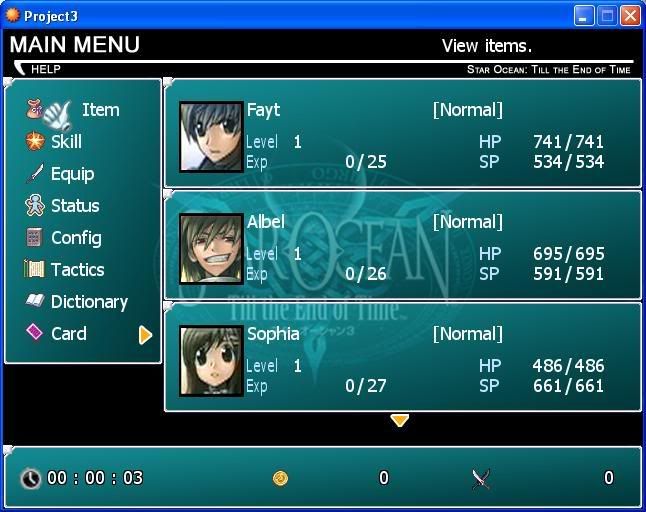
SO3 CMS Main Menu ver 1.7.
Yes, both versions have been up for a little while now, and things are moving steadily foward for a next release. Some more bugs have been worked out and some are still being worked out. If you come across any errors or bugs, please, let me know.
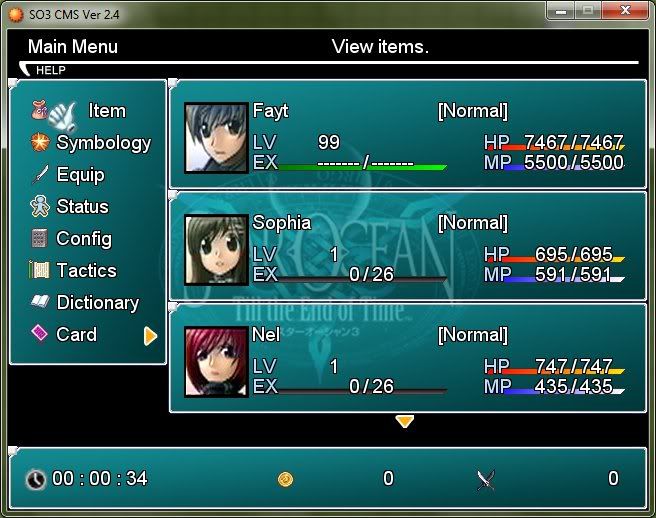
SO3 CMS Main Menu ver 2.4.
Both versions are available for download and are completely available for editing. That's right! You may edit the database, maps, and even the script itself! You will need the legal version of RPG Maker XP (RMXP) and the Standard RTP to run it. To run the game, you need the RGSS104.dll and the Standard RTP, which all comes standard with the installation of RMXP. RMXP is available to get and has a free 30 day trial period. RMXP costs $20 USD (the last I know) to purchase a license. You can download RMXP here.
The links to download the versions are as follows: